“Confession: this is my favorite model. I built it for myself 8 years ago and I still use it every month. It’s detailed yet easy to use, keeps my spending organized and keeps me honest about saving. I call it the ultimate personal budget.”
Patrick Quigley
Where does my money go, when will I be debt free, and should I refinance?
“Confession: this is my favorite model. I built it for myself 8 years ago and I still use it every month. It’s detailed yet easy to use, keeps my spending organized and keeps me honest about saving. I call it the ultimate personal budget.”
Patrick Quigley
Model highlights
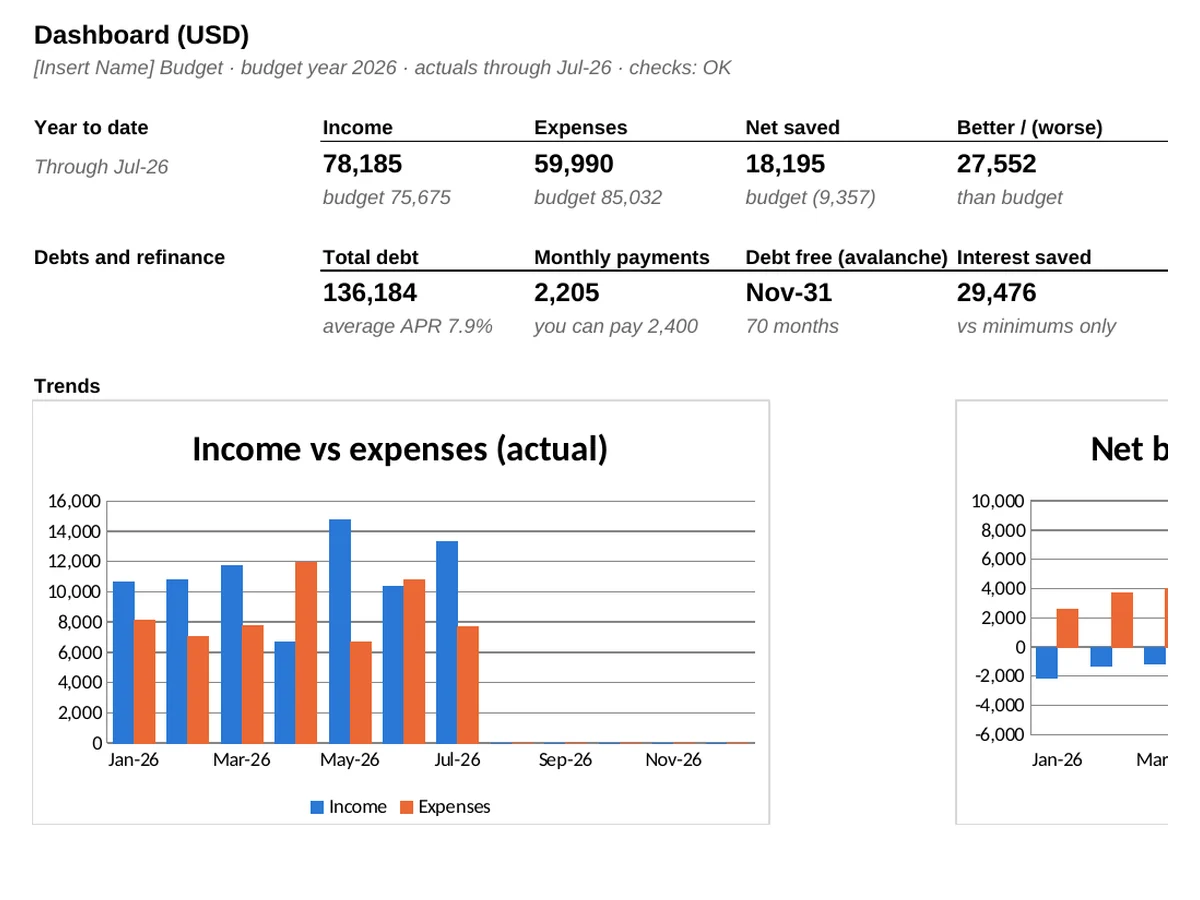
This isn’t just a budget spreadsheet. It’s a personal financial planning tool that connects your everyday spending, savings, debt payoff and mortgage refinancing in one Excel workbook. Plan each month by category, enter what you actually earn and spend, and the Dashboard shows where you stand, when you’ll be debt free and whether a refinance is worth it.
What's included
Reviews
“Patrick nails it with his personal budget tracker. It’s easy to use and more complete than any other I’ve seen on the internet. I’m a happy customer.”
“I’ve tried several ways to manage our household budget, but this Excel model brings everything together in one place. It’s helped us keep track of spending, plan ahead, and get a better picture of where our money is going.”
“What I like most is being able to see the different debt payoff options side by side. Instead of guessing, I can see how different payment strategies affect my timeline and interest costs. It’s a practical tool that helps make the plan feel manageable.”
“This calculator is a hit for me. It breaks down costs perfectly, allowing you to see the installment, fees, and additional charges all in one place. It’s the perfect tool.”
“To the point – detailed, but not overly complicated. It’s great that you can fully customize categories and monitor your budget on the fly. A big plus is the clear and simple formulas.”
“Finally, a decent year-round view! I have everything at a glance – I can see overspending and stick to my savings plan more easily.”
Bought this model? Share your review →
Debt tracking
List each debt with what you owe, its rate and minimum payment, then enter what you can pay toward debts each month. The workbook runs three plans side by side: minimums only, snowball and avalanche.
Snowball pays off the smallest balance first, for quick wins. Avalanche pays off the highest rate first, which usually costs the least.
A box at the top gives the answer: the cheaper plan, your debt-free month and the interest saved. You can also test rolling chosen debts into one consolidation loan.
Snowball: smallest balance first
Avalanche: highest rate first
Sample data: 9 debts
Figures from the sample data copy. Your results depend on your own balances, rates and payments.
Refi calculator
Enter your current loan from your statement and the new offer from the lender's Loan Estimate: rate, length, closing costs, points, and whether the fees go on the loan.
You see the monthly saving, how many months it takes to win back the fees and the total cost of each loan, with a chart.
A lower payment is not always a better deal. A new 20 or 30 year loan can cost more in total, and the calculator says so plainly.
Months to win back fees = Total fees ÷ Monthly saving
Sample data
The current loan has 11 years left and the new one runs 20, so the lower payment costs more overall.
Two Excel (.xlsx) files: one filled with sample data so you can see how everything works, and a blank copy ready for your own numbers. Both download right after purchase, and the instructions are on the Cover tab.
Yes. We can add categories, tabs or reports for your household or small business. Email us with what you need.
Microsoft 365 or Excel 2019 and later, on Windows or Mac. It uses plain formulas with no macros or add-ins. It is built and tested in Excel; Google Sheets and Apple Numbers may open it but are not supported.
It is a working model. The formulas are already linked from tab to tab, so you type your numbers into the yellow input cells and every result, total and chart updates on its own.
Yes. I built it for my own household and still use it every month. Start with the blank copy and enter your own budget, spending and debts.
Because the files download straight away, all sales are final. If a file is damaged, will not open or is materially different from its description, email us within 14 days and we will fix it, replace it or refund you.
No. You pay through our secure checkout (Lemon Squeezy) and get your download link right away on screen and by email. No account or sign-up needed.
DisclaimerQuigley Capital does not provide financial, investment, legal, or tax advice. All templates, calculators, and content are for informational and educational purposes only. Outputs should be independently verified before use in any real-world decision.