“I built this from the underwriting files of a real foreclosure auction team I ran in Phoenix, Arizona. It works backwards from what each type of buyer is willing to pay, so I know my number before I make an offer.”
Patrick Quigley
A deal analyzer for wholesalers, flippers and landlords buying single family homes, duplexes, triplexes and fourplexes.
What is the most I can pay for this property and still make my money?
“I built this from the underwriting files of a real foreclosure auction team I ran in Phoenix, Arizona. It works backwards from what each type of buyer is willing to pay, so I know my number before I make an offer.”
Patrick Quigley
Model preview
Select a sheet tab to preview that worksheet, filled with the sample data.
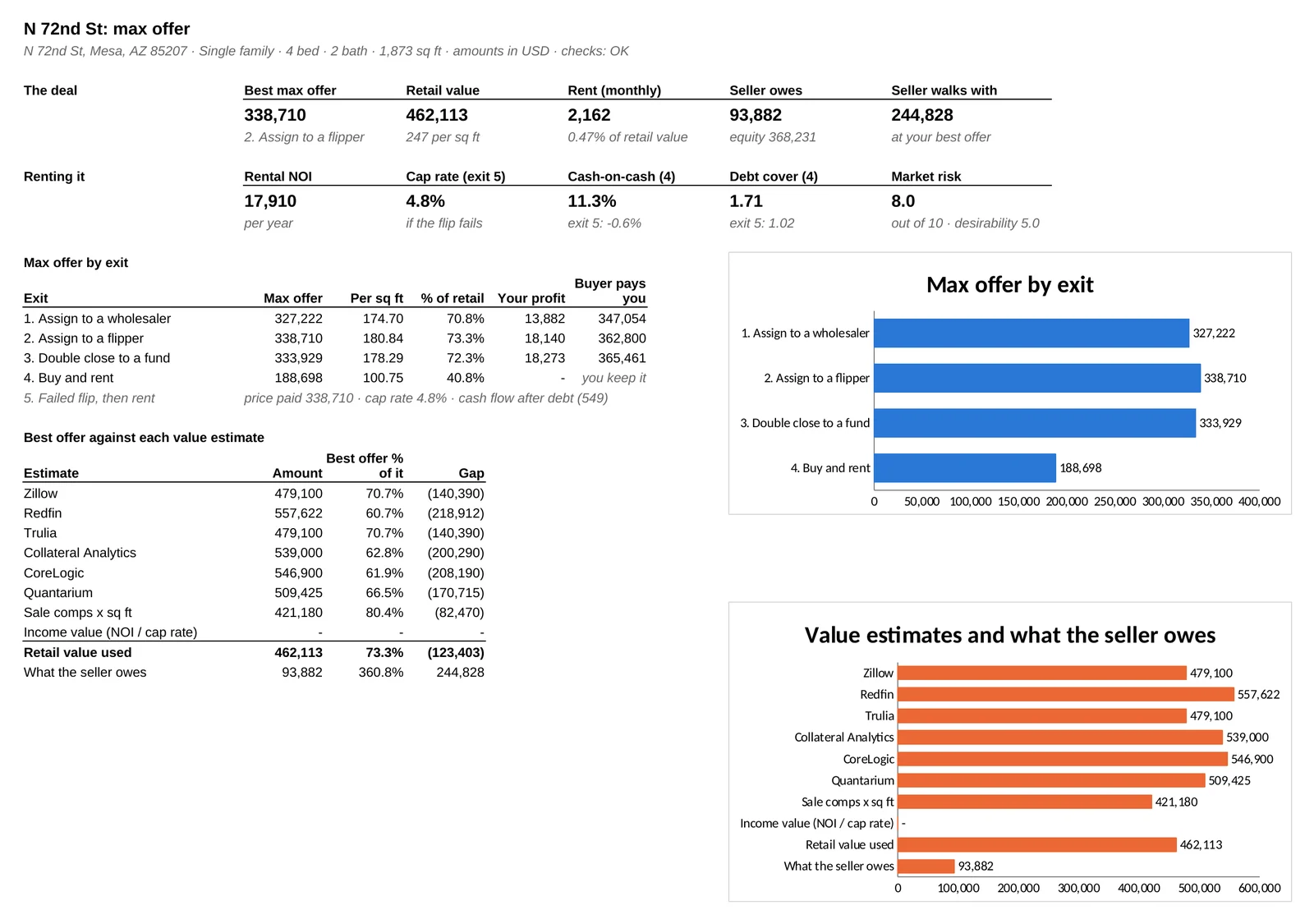
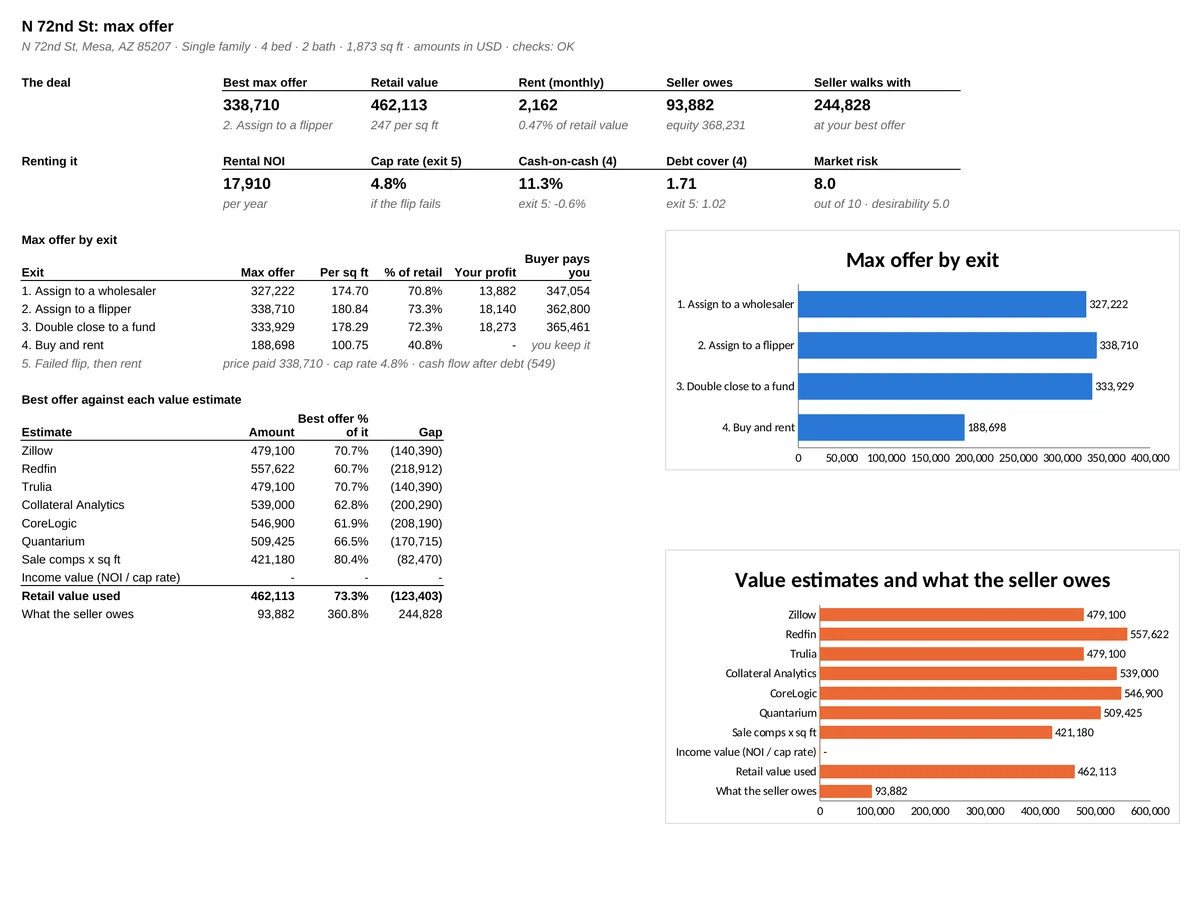
Your best max offer, the max offer for each exit, value estimates against what the seller owes, and two charts. Full size ↗
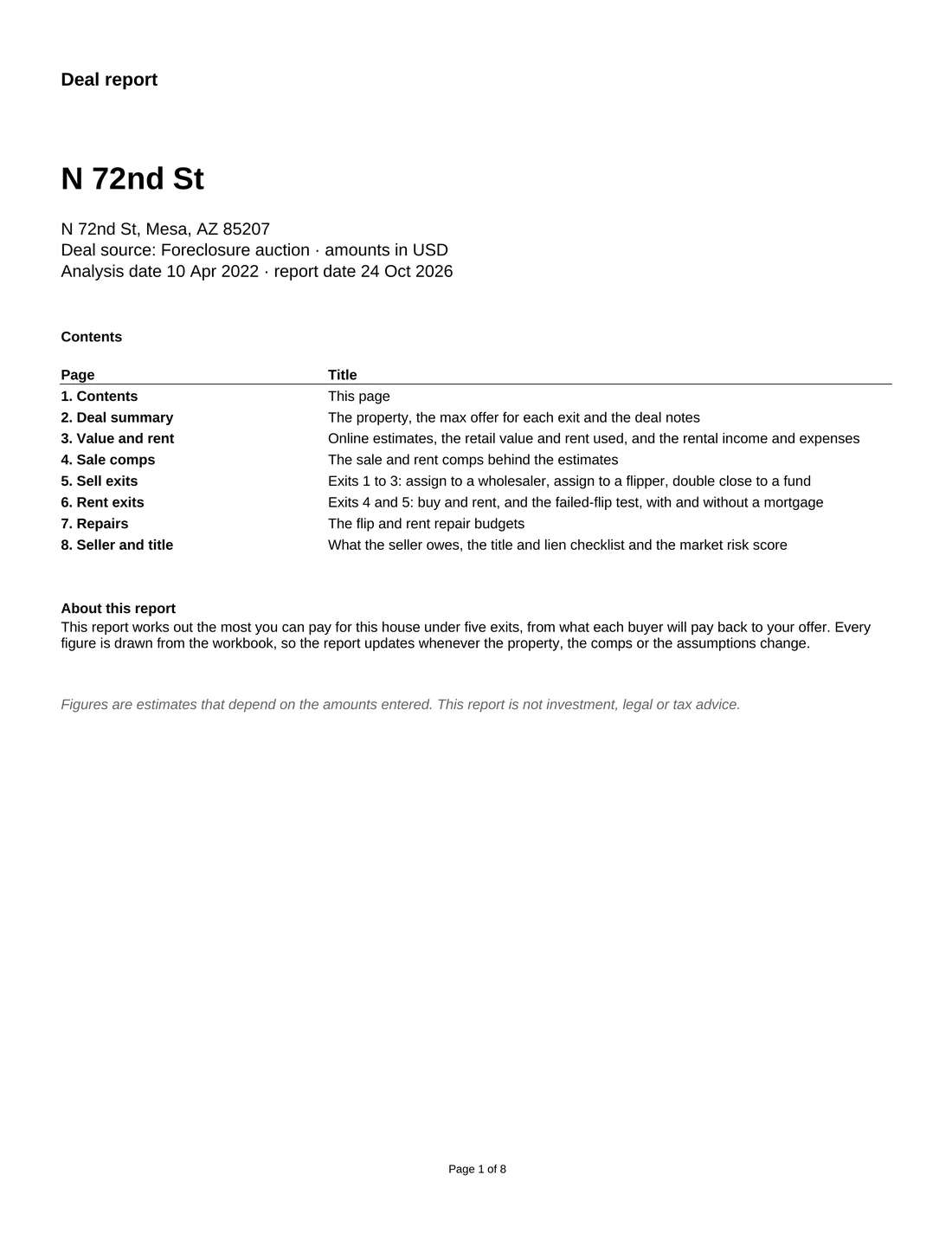
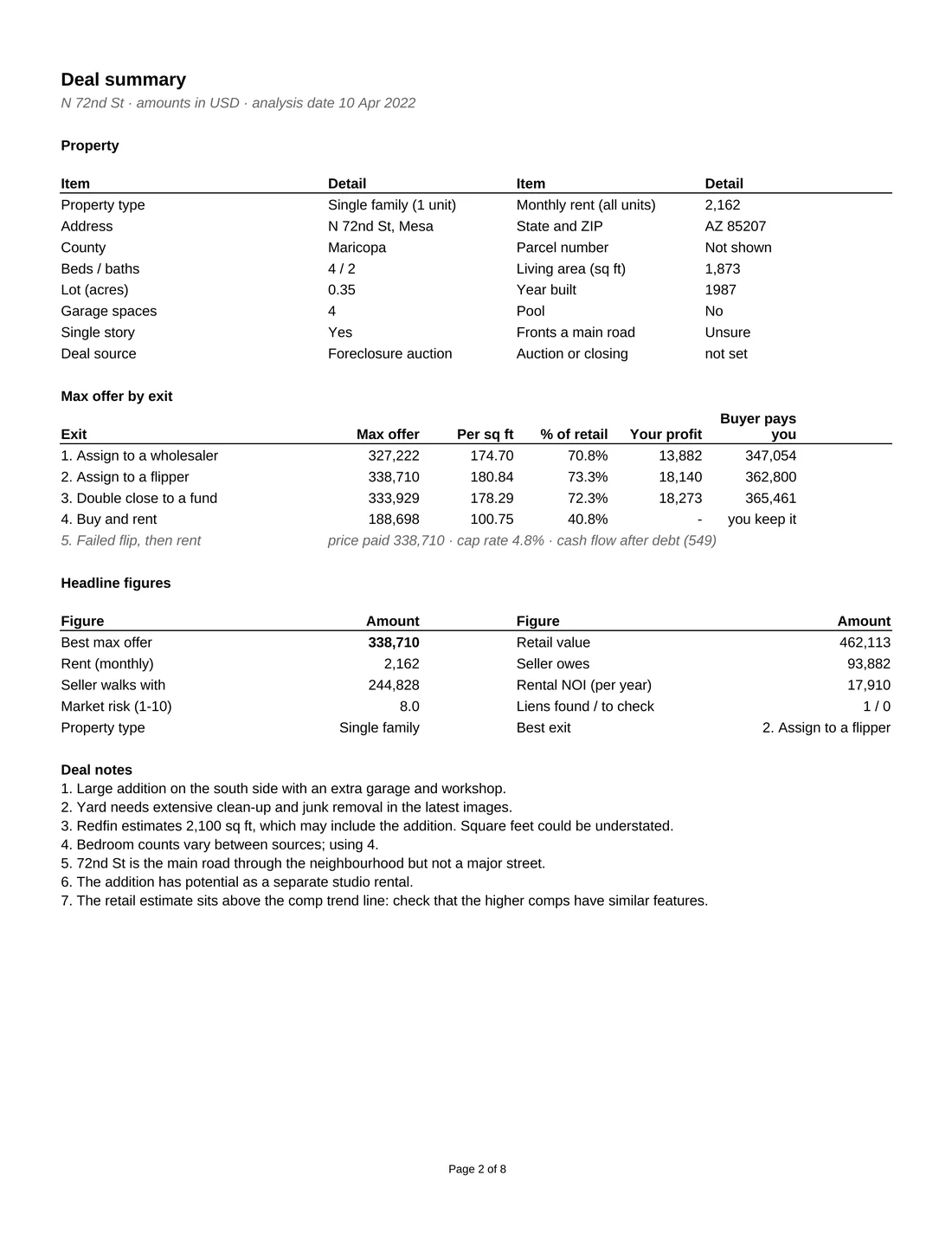
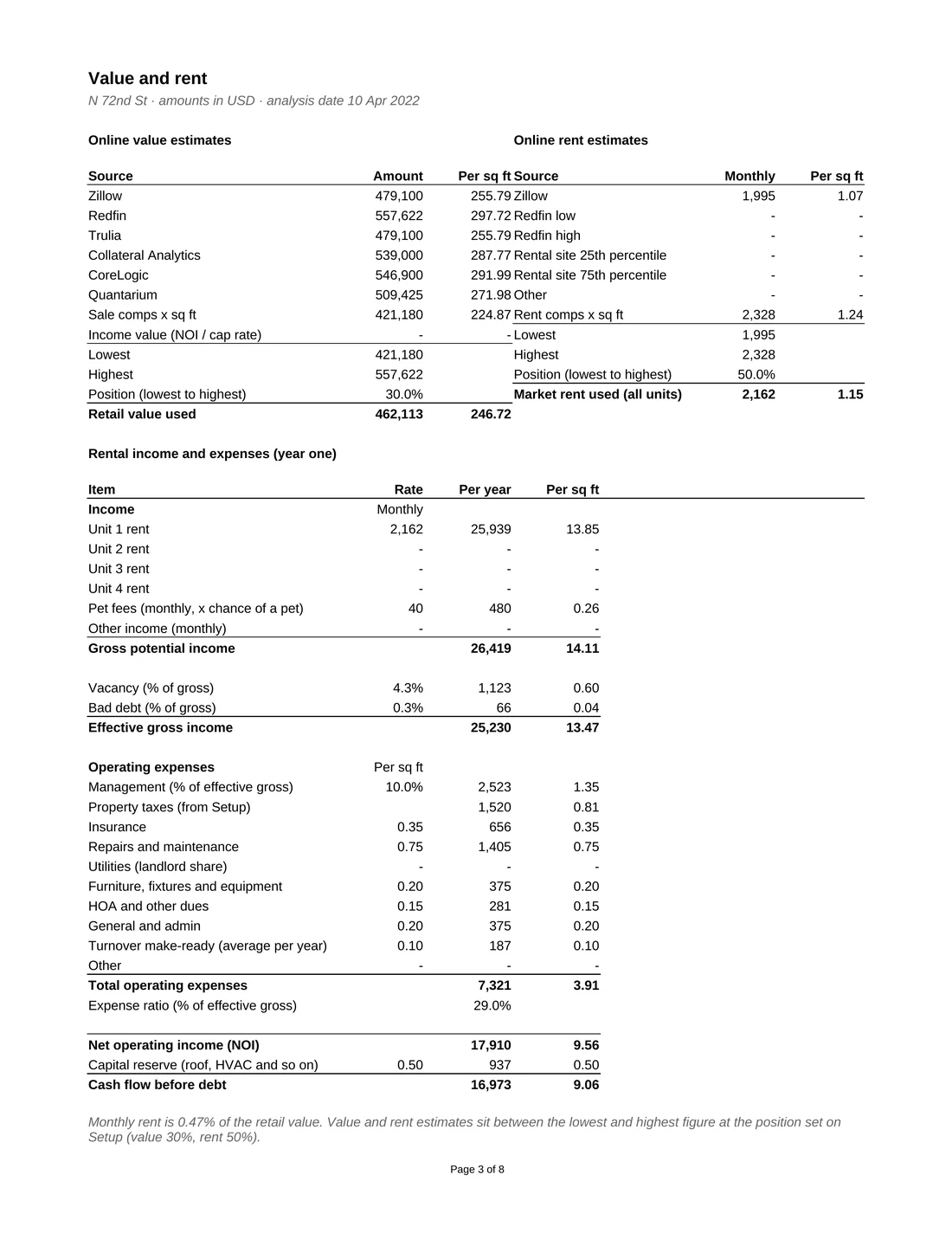
Print-ready report
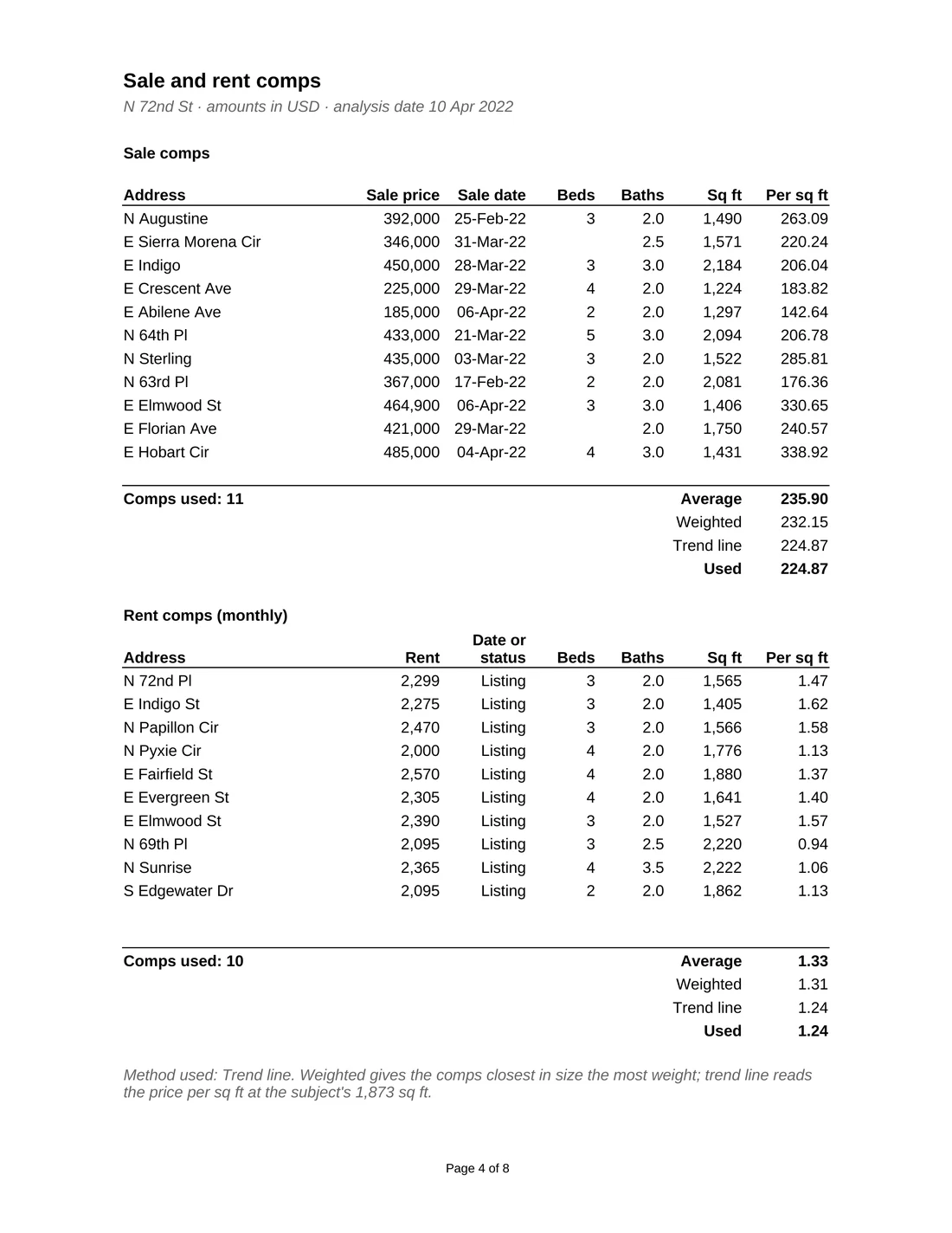
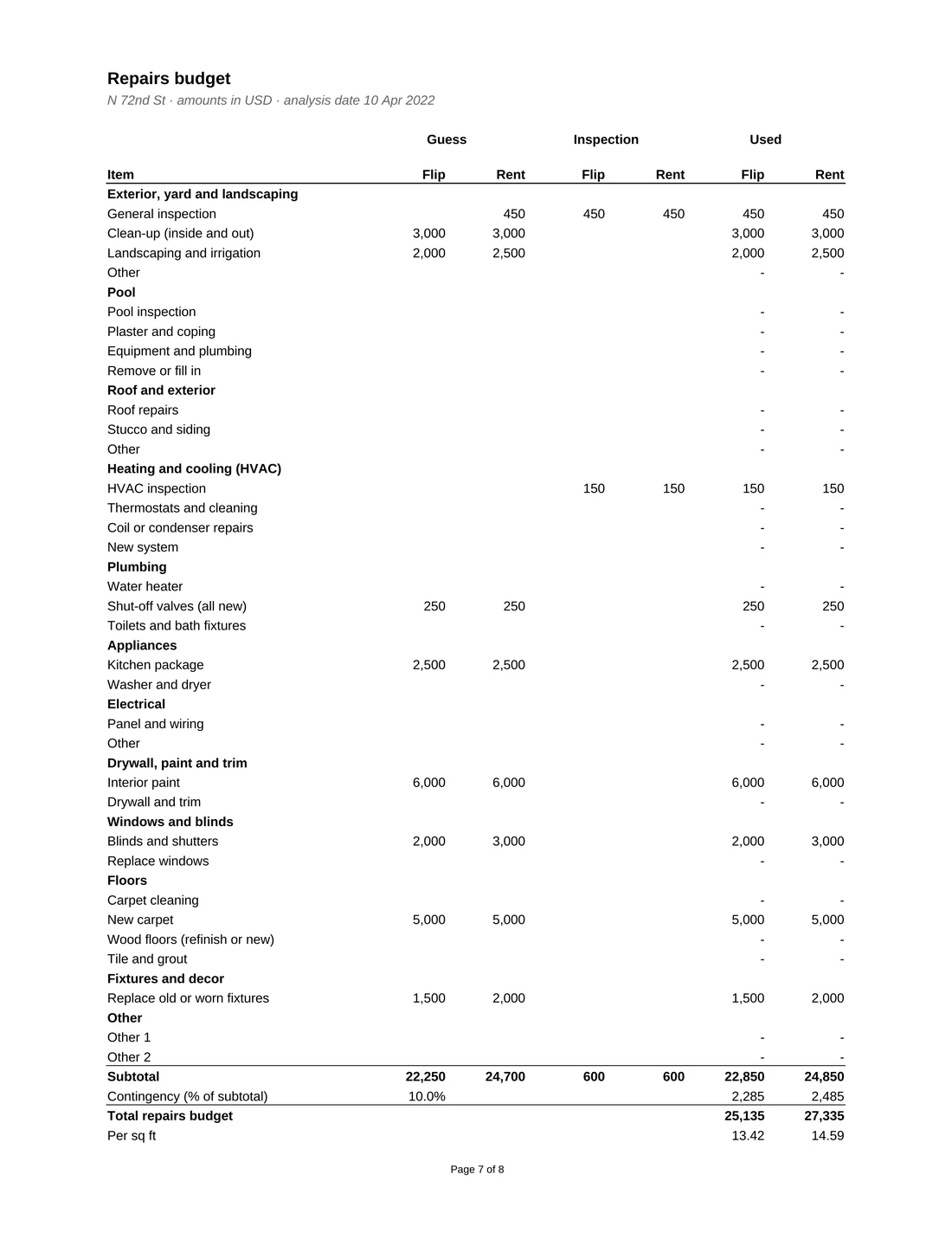
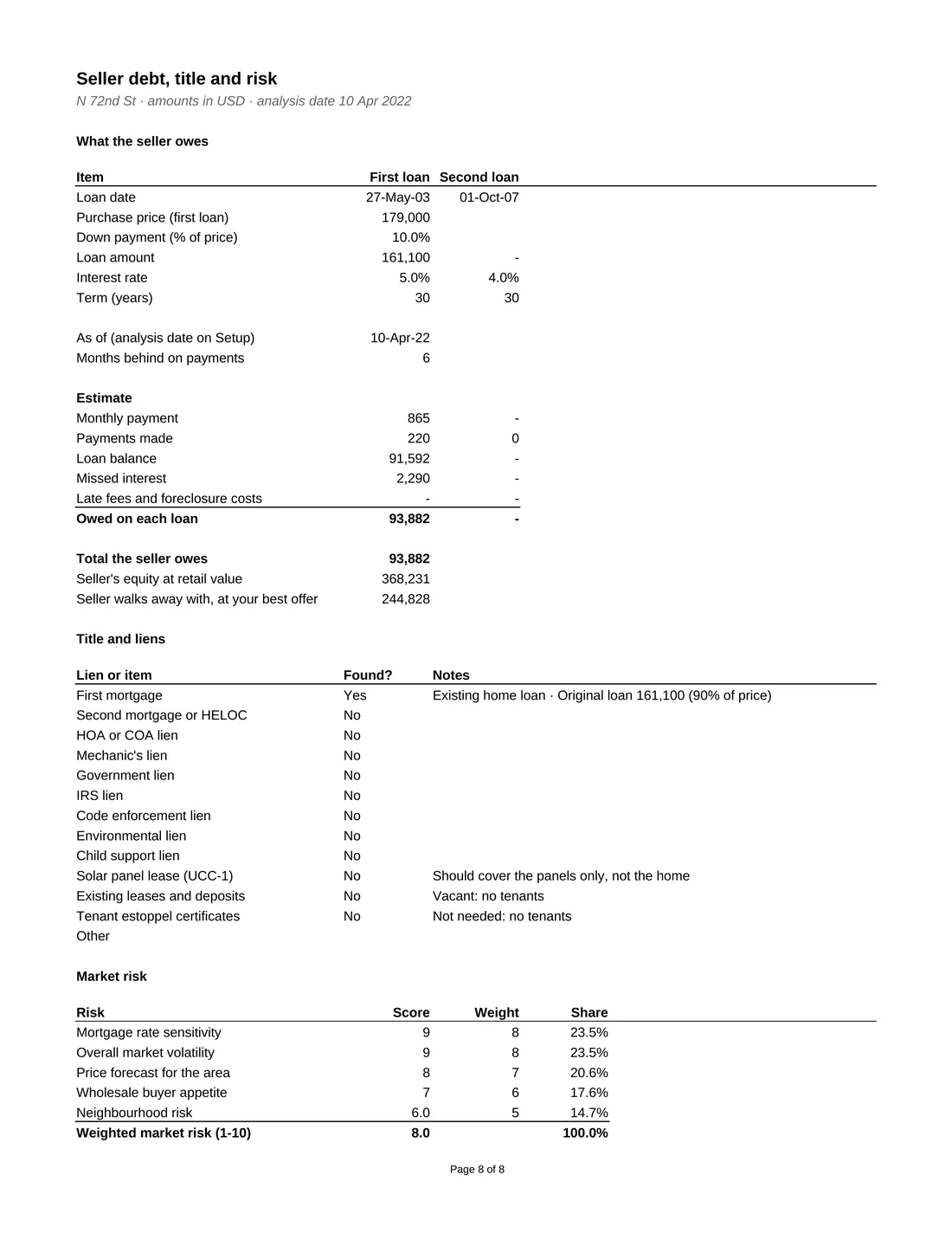
The workbook includes 8 report pages that fill themselves from your numbers: the deal summary, value and rent, your comps, the sell and rent exits, the repairs budget and the seller's position. Print them or save them as one PDF for a partner, lender or buyer.
Model highlights
A deal analyzer for wholesalers, flippers and landlords buying single family homes, duplexes, triplexes and fourplexes. Enter the property, the value estimates, your comps and the repairs, and the workbook works backwards from what each type of buyer will pay to the most you can offer the seller. It also shows what the seller still owes, the cash you need to close a rental and a print-ready deal report.
What's included
One Excel workbook for single family homes, duplexes, triplexes and fourplexes, with five exits side by side, a print-ready report and a 25-page illustrated User Guide. $199, one-time purchase, no macros, with a Google Sheets version too.
From the blog
What a Phoenix foreclosure auction team learned: accurate numbers keep you in business, but deals close because the person in the field listens and the seller trusts them. A real Mesa deal, the max offer math and five lessons.
Read the story →Max offer
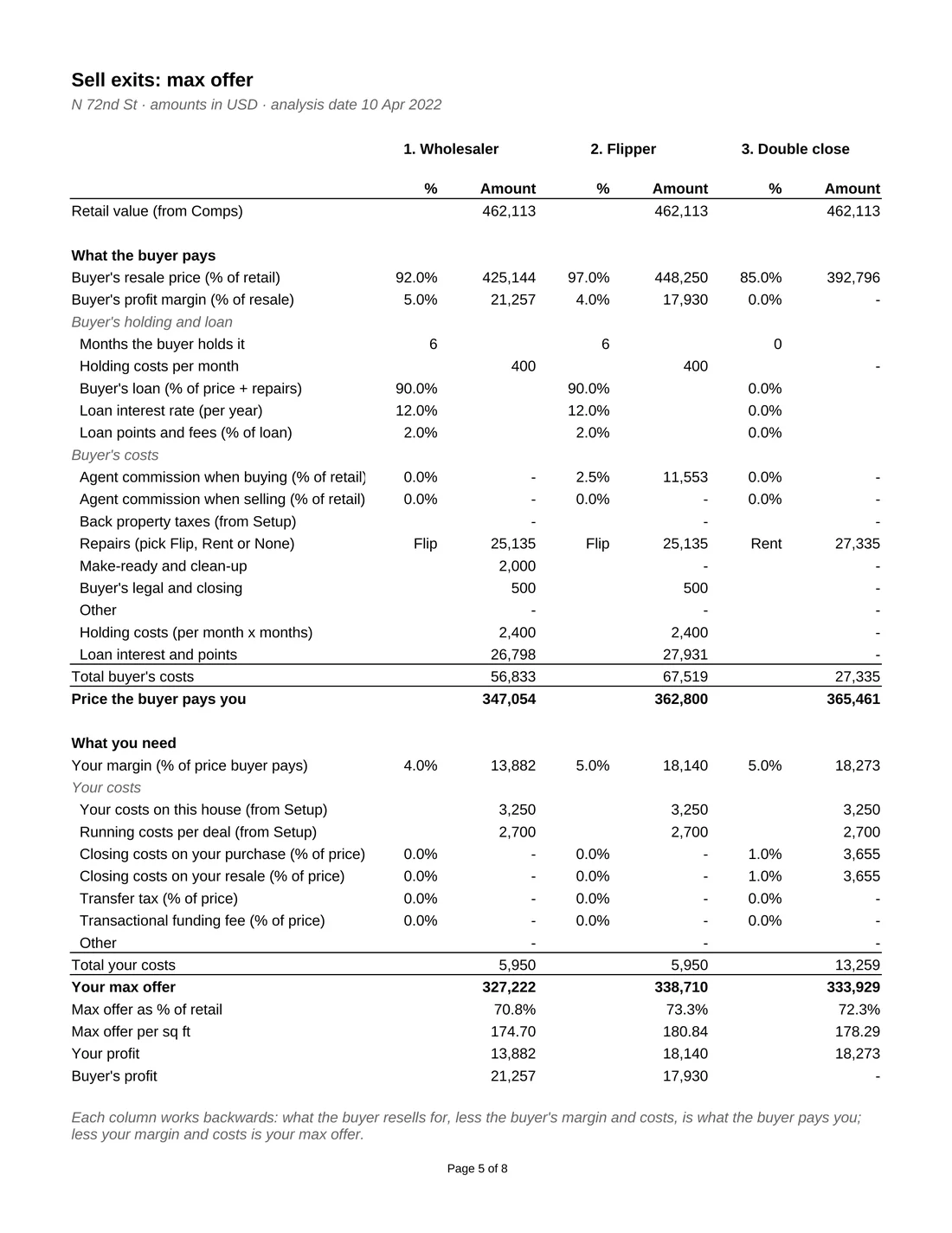
Start with what the property sells for when it is fixed up, then work backwards. Take off what your buyer needs to earn and spend, which gives the price they will pay you. Then take off your own margin and costs. What is left is the most you can offer the seller.
Each type of buyer pays a different price. A wholesaler buyer needs room for another assignment, a flipper needs repairs, holding and loan costs covered, and a fund buys at a fixed share of retail value. The workbook runs all of them side by side so you can see which exit pays most.
Holding costs and hard-money interest are part of the buyer's costs, so a longer project or a pricier loan lowers your offer. The workbook solves for this directly, without circular formulas.
Max offer = Price the buyer pays − Your margin − Your costs
Sample: flipper exit
Figures from the sample data copy, a real 2022 underwriting in Mesa, Arizona. The flipper's costs include repairs, six months of holding costs and hard-money interest and points.
Buy and rent
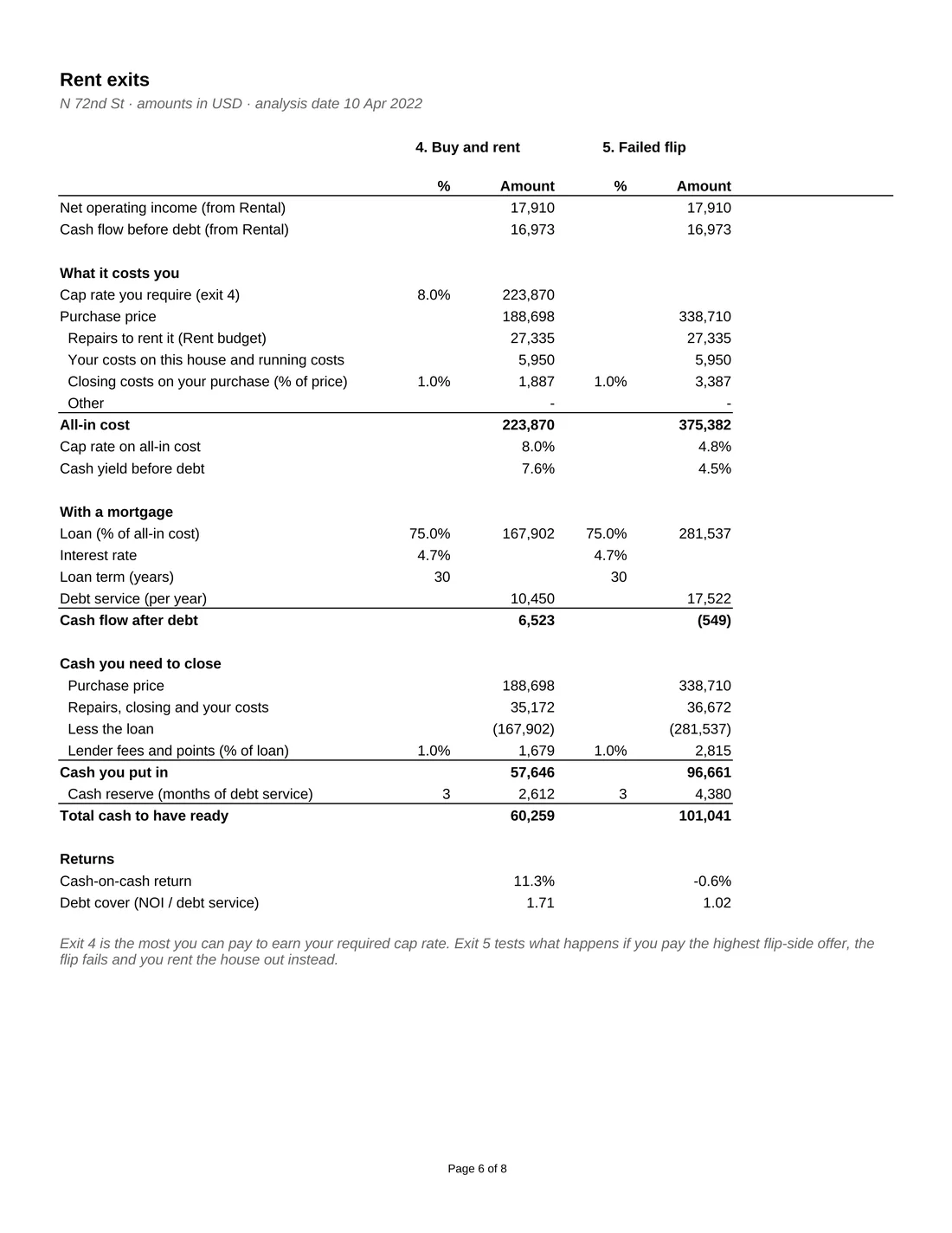
More than the down payment. You also pay for repairs, closing costs and lender fees, and you want a reserve in the bank for vacancies and repairs.
The rental exits show the cash you need to close in one box: the price, repairs and costs, less the loan, plus fees and a reserve of a few months of debt service. Then they show the cash-on-cash return on that cash and the debt cover a lender looks at.
Your max offer on the rental exit comes from the cap rate you require, so the house earns your target return on the full cost before financing.
Cash to close = Price + Repairs and costs − Loan + Fees
Sample: buy and rent
Figures from the sample data copy. Your results depend on your own price, rent, costs and loan terms.
Two Excel (.xlsx) files: one filled with a real 2022 underwriting of a house in Mesa, Arizona so you can see how everything works, and a blank copy for your own deals. You also get a 25-page illustrated User Guide (PDF) and a PDF with two buttons that make your own Google Sheets copies of both, saved in your Google Drive. Everything downloads right after purchase.
Yes. Your purchase includes a Google Sheets version of both files. Click a button in the included PDF, sign in with any Google account and Google makes your own private copy. No Google account? You can create one free at accounts.google.com/signup in a couple of minutes; it doesn't need to be Gmail. The report pages print one tab at a time in Google Sheets.
It is an advanced model, so it comes with a 25-page illustrated User Guide: a quick start for your first deal in 12 steps, a walk through every tab, how to choose your exit, a worked example of the sample deal, troubleshooting and a glossary. Plan on 30 to 60 minutes for your first deal.
You type it in. The Deal Finder and Links tabs open free sites such as Zillow, Redfin, Realtor.com and your county's records, where you find value estimates, sold comps, rents and repair costs. The workbook does not pull data automatically and needs no subscription.
No. It is an estimate built from the numbers you enter. Check your comps, repair costs and rents, get an inspection and a title report, and use your own judgment before you make an offer.
Rules differ. Wholesaling, assigning contracts and double closing are regulated, and some states require a licence or written disclosures. Check your local rules and speak to a real estate attorney before you sign.
Yes. Pick the property type on Setup and enter each unit's size, beds, baths and any current rent. The comps, rental income and exits all work for 1 to 4 units.
Yes. We can add exits, costs or reports for the way you buy. Email us with what you need.
Microsoft 365 or Excel 2019 and later, on Windows or Mac. It uses plain formulas with no macros or add-ins. The search links open in your web browser. Prefer Google Sheets? Your purchase includes a Google Sheets version too, so Excel isn't required. Apple Numbers is not supported.
It is a working model. The formulas are already linked from tab to tab, so you type your numbers into the yellow input cells and every result, total and chart updates on its own.
Yes. It is built for real deal work, not classroom exercises. The results depend on the assumptions you enter, so check them and review the outputs with your advisors before you rely on them.
Because the files download straight away, all sales are final. If a file is damaged, will not open or is materially different from its description, email us within 14 days and we will fix it, replace it or refund you.
No. You pay through our secure checkout (Lemon Squeezy) and get your download link right away on screen and by email. No account or sign-up needed.
DisclaimerQuigley Capital does not provide financial, investment, legal, or tax advice. All templates, calculators, and content are for informational and educational purposes only. Outputs should be independently verified before use in any real-world decision.